Lenovo IdeaPad Flex 14

| Intel Core i5 - 4210U |
.jpg)
| 500 GB +8 GB SSD |


.jpg)
Lenovo IdeaPad Flex 2 14 Notebook Review
Florian Wimmer (translated by Andreas Osthoff), 08/07/2014
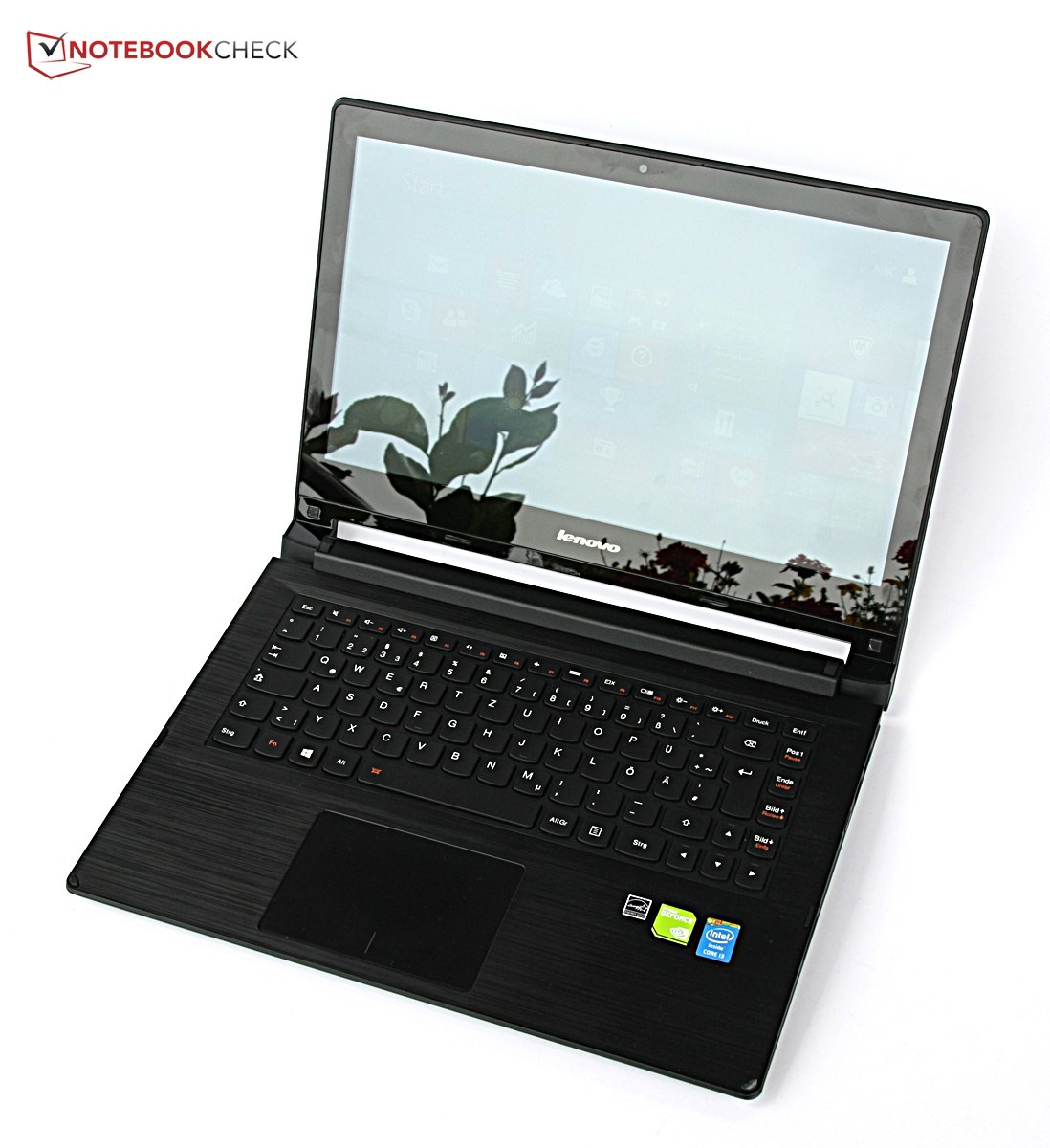
Not quite a Yoga. Lenovo's Yoga devices offer four modes, the Lenovo Flex 2 14 just two. So it is the right choice for anybody who is looking for a flexible notebook, but not a tablet. Our review shows why there is an update not even one year after the IdeaPad Flex 14, where the differences are to the Yoga 2 13 and who could be interested in the Flex 2 14.

Case
Connectivity
The ports have been completely rearranged, but the number and variety of ports did not really change compared to the IdeaPad Flex 14: There is still just one USB 3.0 port, two USB 2.0 ports are on the right side. The only new feature is the possibility to use a notebook lock. However, Lenovo waived the volume rocker on the right side completely. It is still great that we get an Ethernet port, which even supports Gigabit networks.
A 720p webcam is integrated above the display. The quality is sufficient for video calls, but recorded videos show issues with the color reproduction and low-light performance, which means you cannot really use it for other purposes.




Communication
Lenovo is not very generous in regard to the WLAN and integrates a module which supports wireless networks with the standard up to 802.11 n. Fast wireless networks with the latest 802.11 ac standard are not supported, but the n-standard is usually sufficient for private use right now.
The signal quality is okay, Windows indicates 3/5 up to 4/5 bars with a distance of 10 meters from the router and through three walls (individual set-up of the author). Webpages also load pretty quickly. Another two meters and another wall result in 1/5 or 2/5 bars, not the best results we ever measured. It takes perceptibly longer before webpages are loaded with this distance from the router.
Maintenance
You can find a service manual on the Internet that describes the maintenance of the Lenovo Flex 2 14. It is actually not that easy to access the components because you have to remove the keyboard first. You also have to remove the connector of the keyboard, which is not really recommended for inexperienced users. After that you have to loosen several screws before you can lift the bottom cover and then remove the battery, which is once again not that easy. The maintenance of the Lenovo Flex 2 14 is therefore for more experienced users or real professionals. You should not try it if you have never disassembled a notebook before.
Warranty
Lenovo only grants a warranty of 12 months for the devices of the Flex-series. You will have to pay more if you want to extend the service, at least 22.61 Euros (~$30) for a two-year standard warranty. The three-year warranty with accidental protection is the maximum option and costs 103.53 Euros (~$138).
Input Devices
Display
A big difference to the IdeaPad Flex 14 is the much higher display resolution of 1920x1080 pixels, which can even keep up with much more expensive rivals like the Acer Aspire R7-571G or the Asus Transformer Book T300LA. The Acer Aspire R7-571G clearly has an advantage in terms of brightness with 286.7 cd/m²; our review sample only manages 215.3 cd/m². However, the other comparison devices and the predecessor are roughly on the same level compared to our review unit. The brightness distribution is pretty even with 88%, and you cannot see any brightness differences with the human eye, even with large colored areas.
| |||||||||||||||||||||||||
Information
X-Rite i1Pro 2
Maximum: 229 cd/m²
Average: 215.3 cd/m²
Brightness Distribution: 88 %
Center on Battery: 216 cd/m²
Black: 0.21 cd/m²
Contrast: 1029:1
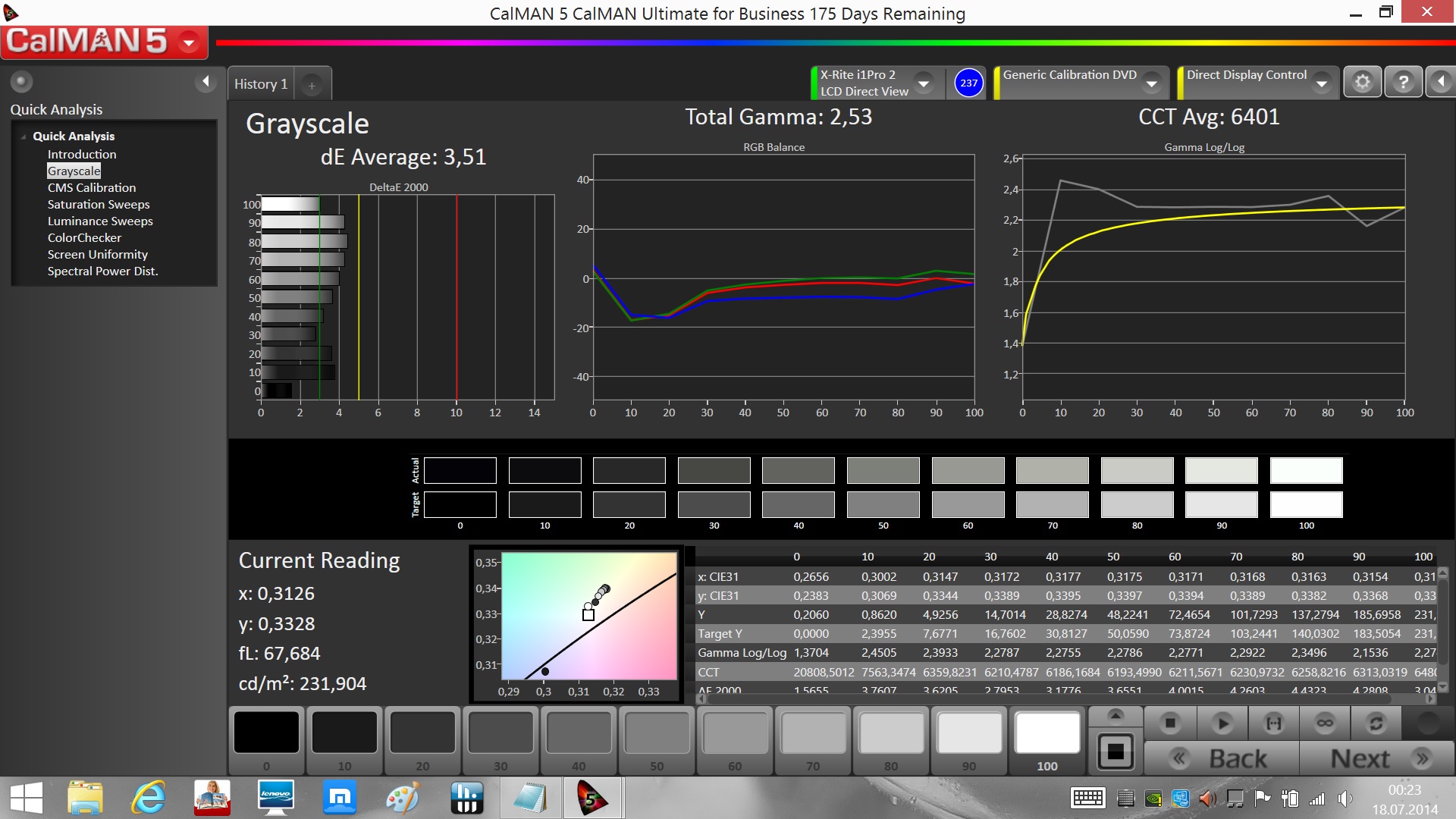
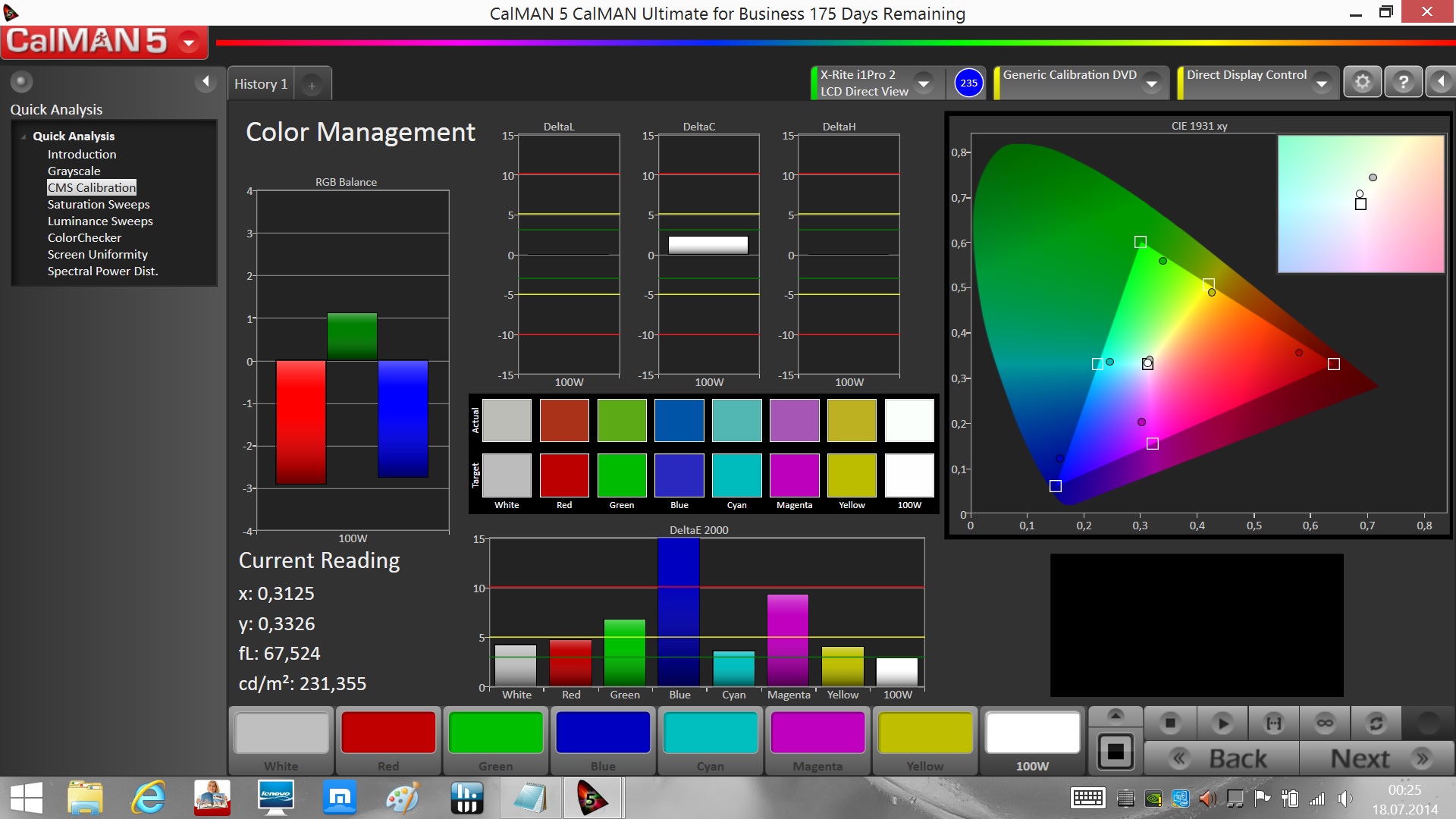
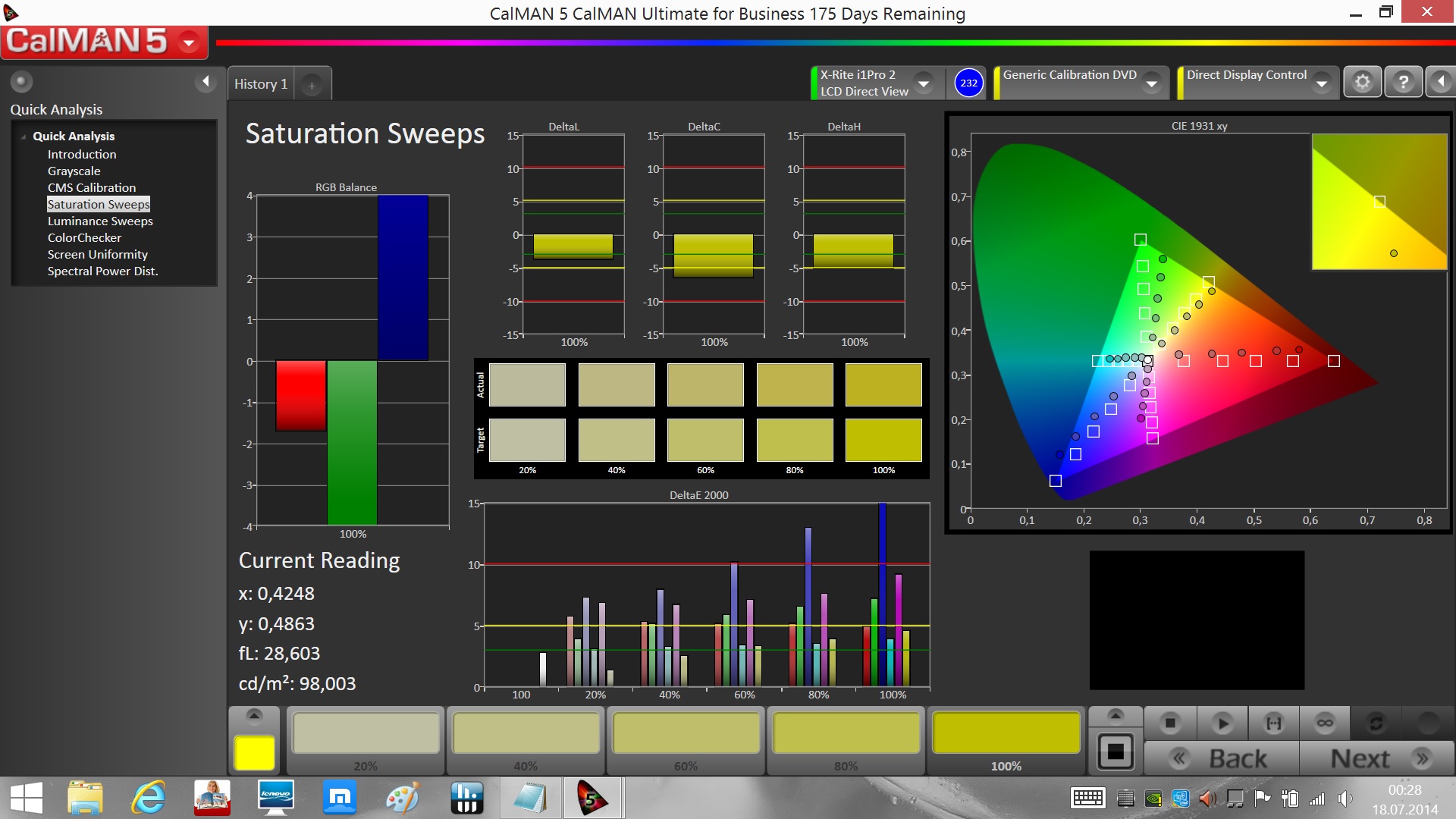
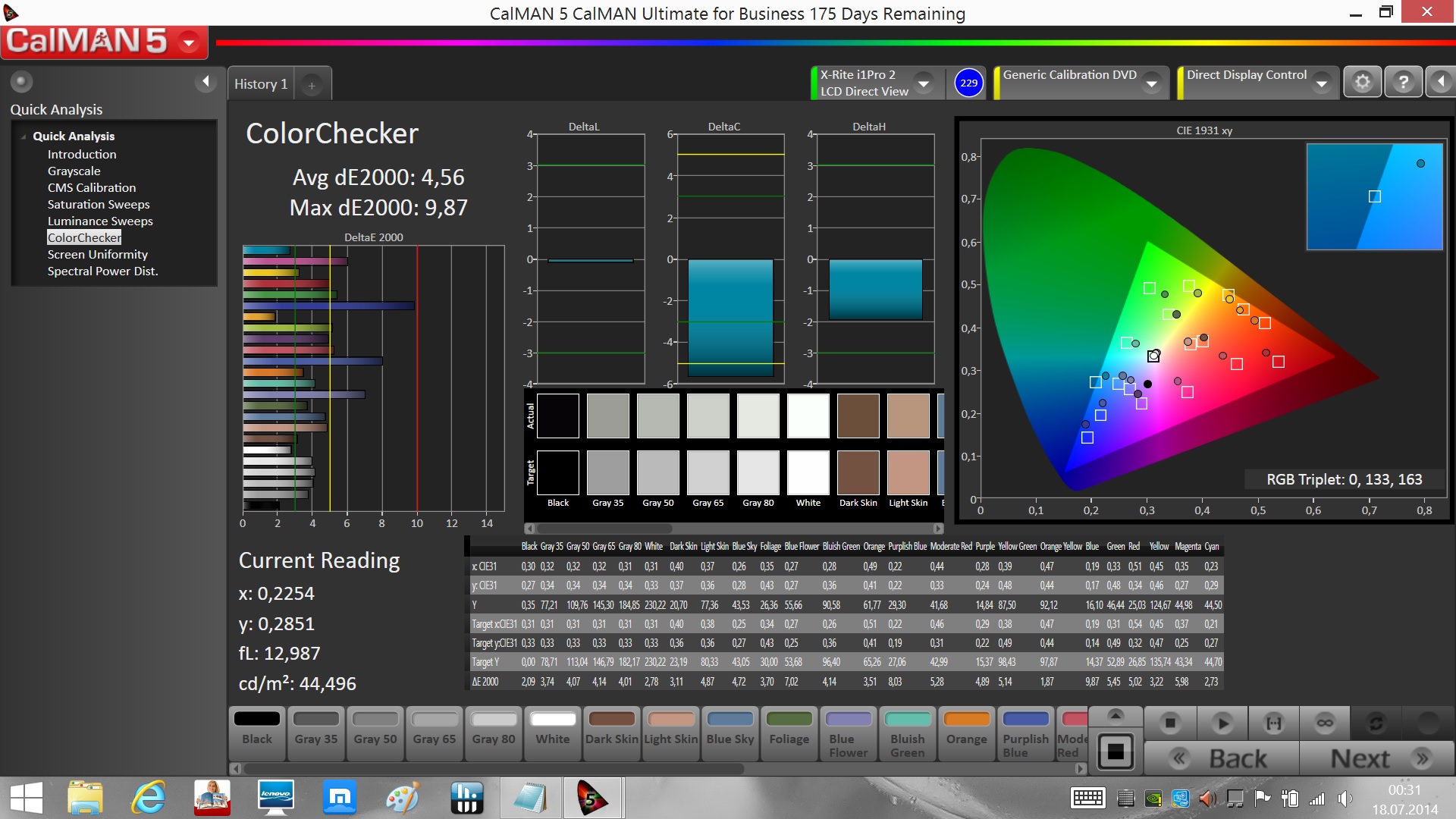
Outdoors you get problems with the very glossy surface of the touchscreen and the low average brightness of the panel. Working in bright environments is an issue, because there will be reflections almost all the time, so it is pretty tiring for the eyes to focus on the display content. There are also issues with reflections in bright indoor environments or in the shade.


Performance
How much performance does the Lenovo Flex 2 14 offer? An interesting question since you get an SSD and a dedicated GPU for the comparatively low price. The amount of memory has been reduced to 4096 MB compared to the predecessor and the processor is only an Intel Core i3-4010U, which does not offer all the features of the Core i5 inside the IdeaPad Flex 14. We still expect adecent office performance and we can maybe even play some games with the dedicated GPU.
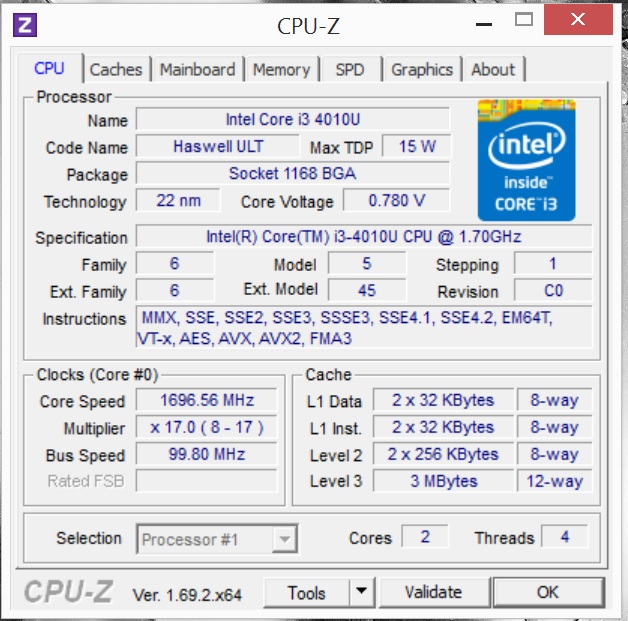
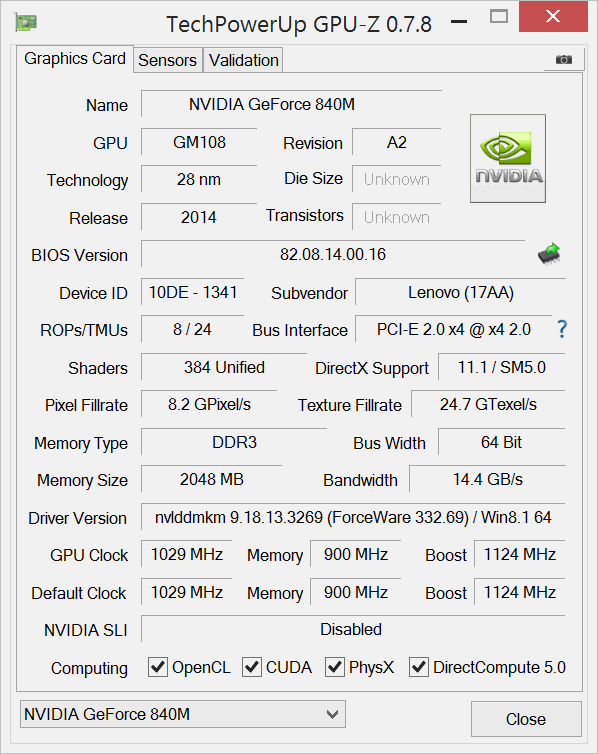
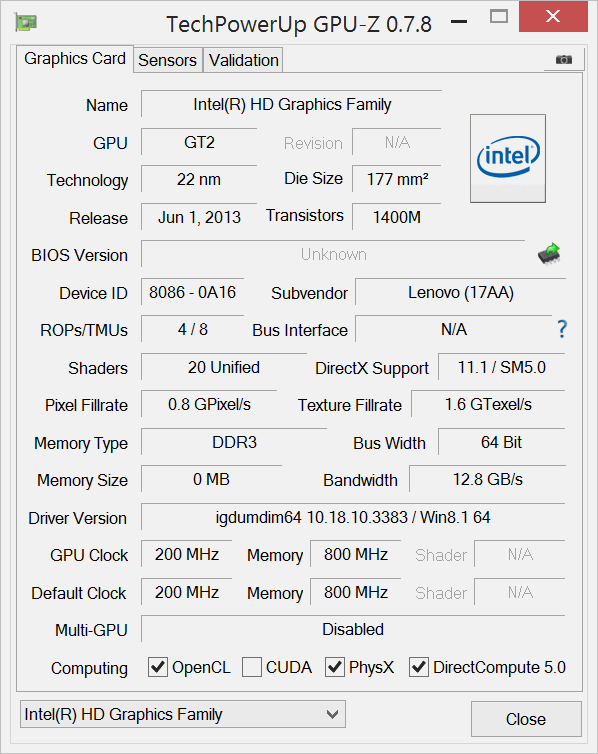
System information Lenovo Flex 2 14
Processor
The IdeaPad Flex 14 used an Intel Core i5-4200U clocked at 1.6 GHz, the Flex 2 14 is equipped with a Core i3-4010U running at 1.7 GHz (probably to keep the price down, despite the dedicated GPU). The main difference is not the clock, but the supported features, where the Core i5 has an advantage over the Core i3. Both processors support Hyper-Threading, which means the two cores can execute up to four tasks simultaneously. However, the Core i3-4010U has no Turbo Boost: While the Intel Core i5-4200U runs with up to 2.6 GHz, the Core i3-4010U stays at up to 1.7 GHz all the time.
This results in a performance disadvantage of up to 35%, or even almost 50% if you use one core, in the synthetic benchmarks of the Cinebench-series. This is perceptible in practice when you navigate the OS, but with more demanding calculations in particular, for example, picture or video editing. That the lower performance is not such an evident problem is a result of the SSD.
Cinebench R11.5 CPU Single 64Bit
0.76 Points


Cinebench R11.5 CPU Multi 64Bit
1.85 Points
Cinebench R11.5 OpenGL 64Bit
29.96 fps
Cinebench R15 CPU Single 64Bit
67 Points
Cinebench R15 CPU Multi 64Bit
171 Points
Cinebench R15 OpenGL 64Bit
50.21 fps
Cinebench R15 Ref. Match 64Bit
99.6 %
Help
Legend
System Performance
The comparison of the system performance with the PCMark-series shows that the dedicated graphics card in particular is the big difference to the other systems: PCMark 8 shows a very big difference in the Creative test because it benefits from more GPU performance. Other devices like the Toshiba Satellite W30t fall behind because of their conventional hard drives.
This means you can expect more performance from the Lenovo Flex 2 14 compared to the rivals when you use GPU-demanding applications. Another performance advantage is the SSD, even though you can only use a capacity of around 100 GB in return. The slow processor prevents even better results.
| PCMark 7 Score |
| 3816 points |
| PCMark 8 Home Score Accelerated v2 |
| 2274 points |
| PCMark 8 Creative Score Accelerated v2 |
| 2536 points |
| PCMark 8 Work Score Accelerated v2 |
| 2877 points |
Help
| PCMark 7 - Score (sort by value) | |
| Lenovo Flex 2 14 | |
| Lenovo IdeaPad Flex 14-59395501 | |
| Lenovo Yoga 2 13 | |
| Asus Transformer Book T300LA-C4006H | |
| Toshiba Satellite W30t-A-101 | |
| Asus VivoBook S451LB-CA072H | |
| PCMark 8 | |
| Home Score Accelerated v2 (sort by value) | |
| Lenovo Flex 2 14 | |
| Lenovo IdeaPad Flex 14D | |
| Asus Transformer Book T300LA-C4006H | |
| Toshiba Satellite W30t-A-101 | |
| Creative Score Accelerated v2 (sort by value) | |
| Lenovo Flex 2 14 | |
| Lenovo IdeaPad Flex 14D | |
| Asus Transformer Book T300LA-C4006H | |
| Toshiba Satellite W30t-A-101 | |
| Work Score Accelerated v2 (sort by value) | |
| Lenovo Flex 2 14 | |
| Lenovo IdeaPad Flex 14D | |
| Asus Transformer Book T300LA-C4006H | |
| Toshiba Satellite W30t-A-101 | |
Storage Devices
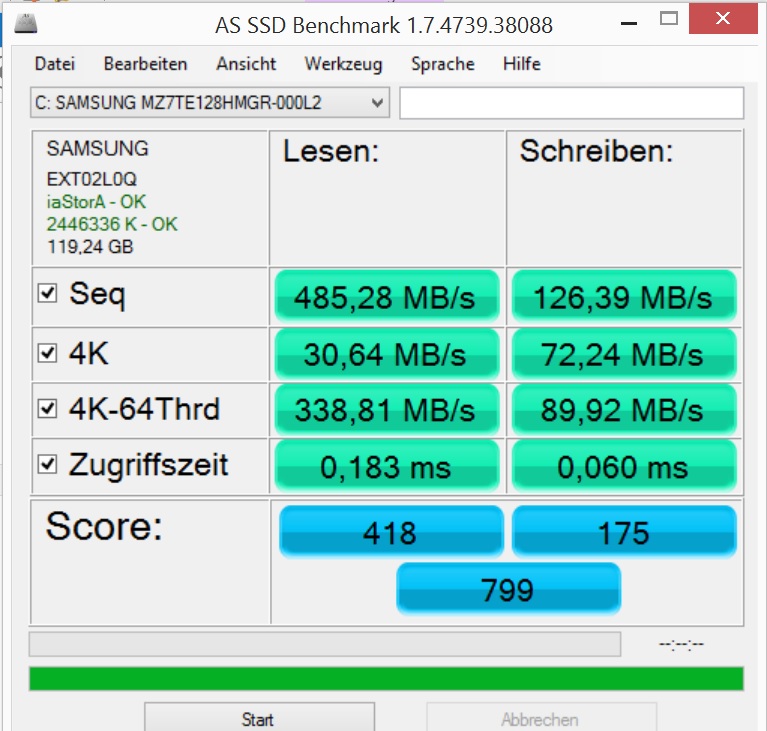
The comparison with the Lenovo Yoga 2 13 quickly shows that a conventional hard drive cannot keep up with the SSD inside the Lenovo Flex 2 14 in terms of transfer rates and access times. We already mentioned that you have to live with significantly less capacity in return. The larger amount of system memory and the faster processor of the IdeaPad Flex 14 enable slightly better results and the SSD inside the Asus Transformer Book T300LA is significantly faster.

Samsung SSD PM851 128 GB MZ7TE128HMGR
Sequential Read: 485.3 MB/s
Sequential Write: 126.4 MB/s
4K Read: 30.7 MB/s
4K Write: 72.2 MB/s
4K-64 Read: 338.8 MB/s
4K-64 Write: 90 MB/s
Access Time Read: 0.18 ms
Access Time Write: 0.06 ms
Score Read: 418 Points
Score Write: 175 Points
Score Total: 799 Points
* ... smaller is better
Graphics
The most interesting topic in the Performance section is certainly the dedicated graphics card: The Lenovo Flex 2 14 is equipped with an Nvidia GeForce 840M that has 2048 MB dedicated memory and a core clock of 1,028 MHz. The 3DMarks show that the mainstream GPU is between 20% and 60% faster than the integrated Intel HD Graphics 4400 and Radeon HD 8210 in the Lenovo IdeaPad Flex 14D, respectively.
The Flex 2 14 can also use the Intel HD Graphics 4400, for example, for simple tasks because it consumes less power. The notebook supports the automatic GPU switching via Nvidia Optimus technology.
Only the Acer Aspire R7-571G and the Asus VivoBook S451LB also use a dedicated GPU within the comparison. Acer's device is clearly ahead with its GeForce GT 750M. The Asus VivoBook S451LB uses a GeForce GT 740M from the last generation, which is a bit slower than the GeForce 840M.
All in all, the Lenovo Flex 2 14 offers quite a lot of GPU performance within the comparison, which expands the usage scenarios. But is decent gaming possible? We will check that in the next section.
| 3DMark 11 Performance |
| 2260 points |
| 3DMark (2013) Ice Storm Standard Score |
| 41150 points |
| 3DMark (2013) Cloud Gate Standard Score |
| 4600 points |
| 3DMark (2013) Fire Strike Standard Score |
| 1286 points |
Help
Gaming Performance
You can play games with the Lenovo Flex 2 14 and the quality is not even bad in some cases: Older or less demanding current titles run smoothly with medium settings. However, you cannot use the native display resolution most of the time.
This results in a problem: Some games show strange behavior. Thief, for instance, only lets you change the resolution when you leave the game; this was not the case for any of our other review units. Tomb Raider does not scale lower resolutions to the full display size. The same applies forAnno 2070, even though the full-screen option is activated. But the mouse overlay does, so there are issues when you play the game. We suspect that this is a result of the new calculation of the picture from the GPU by the display controller.
We could launch Diablo III and also heard the audio, but the display just did not want to show a picture. The game ran after we switched to the Intel HD Graphics 4400, but the performance was obviously worse. There are also picture errors: Shifted lines appear that look as if they would be from a larger-scaled picture. However, this last issue could be solved with an update to Nvidia's latest reference driver.
The GeForce 840M is at the bottom in terms of performance: The majority of comparison devices with the same GPU usually manage a couple of frames more. This is most likely a result of the pretty slow processor, which restricts the performance of the mainstream GPU.
| low | med. | high | ultra | ||
| StarCraft 2 (2010) | 171.2 | 74.3 | 41.2 | 19.6 | fps |
| Anno 2070 (2011) | 126 | 58 | 36 | 18.3 | fps |
| Diablo III (2012) | 61.5 | 36.4 | 30.5 | 17.2 | fps |
| Dead Space 3 (2013) | 121.3 | 59.2 | 45.3 | 18.3 | fps |
| Crysis 3 (2013) | 38.2 | 23.1 | 16.5 | 5.7 | fps |
| Tomb Raider (2013) | 120.3 | 59.7 | 29.3 | 11.4 | fps |
| SimCity (2013) | 149.6 | 36.9 | 25.4 | 11.3 | fps |
| BioShock Infinite (2013) | 67 | 47 | 38 | 13 | fps |
| Metro: Last Light (2013) | 36 | 32 | 21 | 11 | fps |
| Assassin´s Creed IV: Black Flag (2013) | 39.8 | 30.5 | 16.4 | 7.9 | fps |
| Thief (2014) | 31.9 | 20.9 | 16.9 | 8.3 | fps |
| Titanfall (2014) | 52.1 | 38.7 | 30.2 | 19.2 | fps |
| The Elder Scrolls Online (2014) | 67.5 | 47.2 | 34.2 | 17.5 | fps |
| Wolfenstein: The New Order (2014) | 31.7 | 30.9 | 14.8 | 5.4 | fps |
| Watch Dogs (2014) | 36.7 | 27.9 | 12.5 | 6.7 | fps |
Emissions
System Noise
The Flex 2 14 is, fortunately, pretty restrained in terms of system noise: The fan is often completely deactivated during idle. It only starts running if the applications get more demanding. The result is a slight murmur, but a maximum noise of 30.4 dB(A) during idle is hardly audible.
The notebook reaches up to 36.4 dB(A) if you play games or use very complex applications, but this is still pretty quiet. The successor IdeaPad Flex 14, the Lenovo Yoga 2 13 or the Acer Aspire R7-571G are louder, whereas the Toshiba Satellite W30t or the Asus Transformer Book T300LA are quieter with hardly audible fans.
Noise Level
| Idle |    29.2 / 29.8 / 30.4 dB(A) 29.2 / 29.8 / 30.4 dB(A) | ||||
| Load | 33.2 / 36.4 dB(A) | ||||
     | |||||
| 30 dB silent | 40 dB audible | 50 dB loud | |||
min:
, med: , max: Voltcraft sl-320 (15 cm distance) | |||||
Temperature
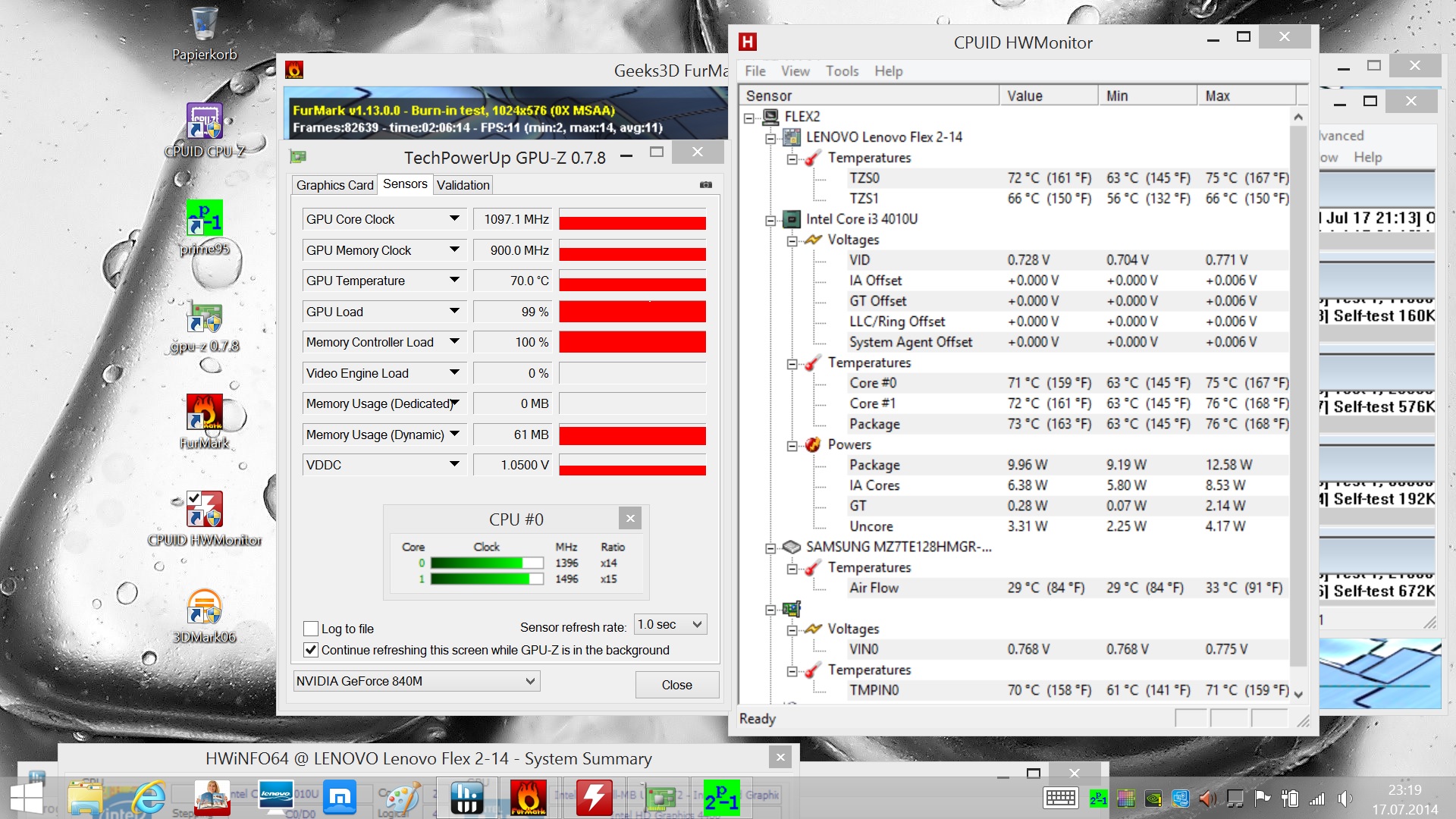
| |||||||||||||||||||||||||
| Maximum: 42 °C Average: 37 °C | |||||||||||||||||||||||||
| |||||||||||||||||||||||||
| Maximum: 47.9 °C Average: 38.6 °C | |||||||||||||||||||||||||
Power Supply (max.) 50.7 °C | Room Temperature 24 °C | Voltcraft IR-900
Speakers
The speakers of the Flex 2 14 are underneath the front edge of the notebook. You can select different profiles for the sound with the Dolby Digital Plus software or use an equalizer to adjust the sound to your own preferences.
All in all, the speakers are not too bad and actually sound a bit better compared to the IdeaPad Flex 14: The maximum volume is still pretty high, but there are no distortions. The speakers have a hard time creating a really differentiated sound with very rich pieces (singer, orchestra and choir), but you can still hear the individual instruments and the voices, which is not a matter of course for every notebook. The high tones are too rich and there is hardly any bass, but the overall sound is pretty balanced.
Music and movie enthusiasts are certainly going to use external speakers for the long term, but the fact that there is only one stereo jack could be an issue, because you cannot attach a microphone beside the speakers. This also means you cannot use high-quality headphones with one connector each for the headphones and the microphone.
The integrated microphone actually consists of two microphones, a so called dual-array microphone. This can help to separate background noise from voices, and the voice was actually very clear and the ambient noise pretty quiet in a short test call via Skype.
Energy Management
Power Consumption
Our review sample leaves a mixed impression in regard to power consumption: The 0.1 Watts when the device is turned off could be improved; most of the comparison devices actually don't consume any power. The stand-by consumption is also comparatively high with 0.3 Watts. The idle consumption is at the lower bottom of the comparison with 7.7 Watts on average, but the maximum idle value is a bit higher with 12.9 Watts. The average consumption under load is pretty average with 33 Watts because of the dedicated graphics card, just like the maximum consumption of 46.3 Watts.
All in all, the consumption of the Lenovo Flex 2 14 is decent. The device does not break any new records in terms of power consumption, but it does not waste any power either when you consider the performance.
Still, there is one unrivaled winner in terms of saving power: The Asus Transformer Book T300LA uses a surprisingly small amount of energy in every scenario, but it does not have a dedicated graphics card.
Power Consumption
| Off / Standby | 0.1 / 0.3 Watt |
| Idle | 4.7 / 7.7 / 12.9 Watt |
| Load | 33 / 46.3 Watt |
| |
| Key: min: , med: , max: Voltcraft VC 940 | |
Battery Runtime
Compared to the IdeaPad Flex 14, the battery of the Flex 2 14 is much smaller: Lenovo reduced the capacity from 48 Wh to 32.5 Wh. This can be a problem since the IdeaPad Flex 14 was already equipped with a processor from the Haswell generation and did not have a dedicated GPU. Unfortunately, there are no records of the IdeaPad Flex 14's consumption in our database, so we cannot make a direct comparison.
However, the battery runtimes compared to the IdeaPad Flex 14 are on the same, pretty mediocre level if you don't use the dedicated graphics card: The Asus Transformer Book T300LA or the Toshiba Satellite W30t can sometimes even double the battery runtimes, but they always manage longer runtimes away from a socket.
If you just write text or browse the web, the Lenovo Flex 2 14 does not manage a whole business day with 5:42 hours. The runtime when you watch a video is more practical with 5:02 hours, but it is still significantly shorter than the almost 10 hours of the Asus Transformer Book T300LA.
The runtimes that Lenovo squeezes out of the admittedly small battery are practical, but other devices are significantly better nonetheless.
Battery Runtime
| Idle (without WLAN, min brightness) |
| 7h 45min |
| WiFi Surfing |
| 5h 42min |
| Big Buck Bunny H.264 1080p |
| 5h 02min |
| Gaming |
| 1h 13min |
| Load (maximum brightness) |
| 1h 03min |
Verdict

1 comments
post your questions, comments or corrections here
#1 tawse57, 22:11 09.08
In the UK they are offering this with an i5-4210U Haswell, 6GB RAM, a 500GB HDD and the webcam is reported to have 2 x USB 3.0 ans 1 x USB 2.0 - although I wonder if that is a typo.
I think the positive thing about this notebook is that it finally brings 1920 x 1080 touchscreens down dramatically in price. For too long too many firms have been charging a premium for full 1080p screens and this has basically reduced by halve, in the UK anyhow, the price between this and the next full 1080p touchscreen on the market. Other firms such as Dell, HP, etc, will now be forced to drop their prices.
One thing I dislike Lenovo is that they keep advertising their laptops in numerous colours but, in the UK, they seem to only ever sell them in black or grey... and occasionally in orange...
